Page 1 of 1
Forum has moved to a new host
Posted: Tue Jan 08, 2019 11:21 pm
by ChristopheF
You may have noticed some forum downtime earlier today: this is because I have moved the forum to another web hosting company.
The previous host was cheap at 1$/month and yesterday they now wanted 5$/month for the same service (which is quite minimal).
I was pissed off so I found an alternative host, paid for a year of hosting and performed the migration. If we are not satisfied in the next 30 days, I can move it again elsewhere and get a refund.
The new host will cost a little bit more: 1,2€=1,35$/month for the first year and then 2,4€=2,70$/month, but it offers better features and seems more professional. Performance is also better for me, but your experience may vary.
Tell me if you find any issue.
Hosting + domain name fees should be around 25$ for the first year, and then around 42$ after that. I am considering taking donations (using Paypal donations or another similar service) to help finance the forum hosting in the long term. What do you think?
Re: Forum has moved to a new host
Posted: Wed Jan 09, 2019 2:05 pm
by Gambit37
Thanks Christophe. I've had very bad connectivity to the forum over the last few months, lots of 503 and 500 errors, so this seems like a good move.
Re: Forum has moved to a new host
Posted: Wed Jan 09, 2019 5:43 pm
by Paul Stevens
Christophe wrote: I am considering taking donations
I will match any donations.
Re: Forum has moved to a new host
Posted: Thu Jan 10, 2019 7:44 pm
by ChristopheF
I have enabled https on the new host with automatic redirection from http to https.
And the phpbb software was upgraded to the latest available version.
Re: Forum has moved to a new host
Posted: Sat Jan 12, 2019 12:56 pm
by Gambit37
Thanks Christophe. I'm not sure the redirect to https: is working: I'm still seeing all pages unsecured in http: ?
Re: Forum has moved to a new host
Posted: Sat Jan 12, 2019 8:29 pm
by ChristopheF
Re: Forum has moved to a new host
Posted: Wed Nov 12, 2025 10:26 am
by Gambit37
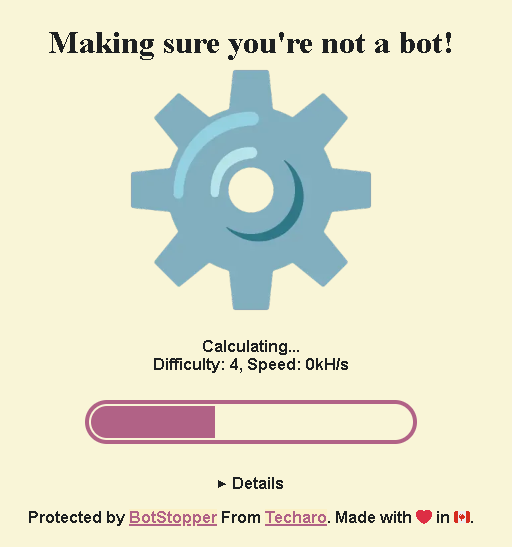
Just checking in. Did something change with hosting recently? I noticed the site was offline for a bit and when I looked today, some kind of bot challenge filled the page before the site loaded.
Whether the host changed or not, I'm happy to donate towards current and future hosting, let me know the best way to do that. Is it using the Donate button?
Re: Forum has moved to a new host
Posted: Wed Nov 12, 2025 1:21 pm
by ChristopheF
Yeah I caused some downtime. I moved the forum from a dedicated but obsolete VPS plan to a shared hosting plan (still at the same hosting company LWS). They have a good bargain during the black friday timeframe, I paid 50€ for the next 2 years of hosting+domain name.
I am not aware of any bot challenge (never seen it yet on my side). Does it appear each time you connect here, before showing the forum page? Maybe this is only for users from other countries?
The donate buttons here on the forum and on the Encyclopaedia go to a Paypal account dedicated for that kind of costs.
Re: Forum has moved to a new host
Posted: Wed Nov 12, 2025 4:03 pm
by Ameena
When I loaded the forum just now, there was very briefly a kind of beigey-yellow screen with a large cogwheel on it. I don't know what that was all about and it was only there for about half a second so I didn't have time to see anything else, but the forum seemed to load fine right after that. Wasn't too surprised, then, to see there were new posts in this thread as I figured either something's been changed or the forum's been hacked or something

.
Re: Forum has moved to a new host
Posted: Wed Nov 12, 2025 7:39 pm
by ChristopheF
In the hosting settings, there is a "ModSecurity" WAF feature that is enabled by default and that I did not bother to look into.
Maybe that is what is causing the bot challenge/cogwheel that you both saw.
I tried multiple browsers and access from other countries using a VPN but I have not seen anything yet myself.
Is it annoying when you access the forum? or simply something that you noticed and reported? I mean, do I need to fix something?
Re: Forum has moved to a new host
Posted: Wed Nov 12, 2025 11:40 pm
by Gambit37
I don't think it needs fixing, I saw the same as Ameena: a big cog for a split second and then the forum loads.
I can't currently add anything using the Donate button, there's a problem with my PayPal account which I need to resolve first. I'll sort that out and make a donation.
EDIT: Donation now made

Re: Forum has moved to a new host
Posted: Thu Nov 13, 2025 12:03 am
by ChristopheF
@Gambit: Many thanks for your generous donation !

@All: Please report any other annoyances or issues with the forum in the coming weeks in case anything needs tuning or fixing.
Re: Forum has moved to a new host
Posted: Thu Nov 13, 2025 10:33 am
by Gambit37
FYI the loading animation was slower today and I could see it says "Making sure you're not a bot...".
Re: Forum has moved to a new host
Posted: Thu Nov 13, 2025 10:40 am
by Sphenx
I've caught it
Re: Forum has moved to a new host
Posted: Thu Nov 13, 2025 2:15 pm
by ChristopheF
Thanks for the screenshot.
BotStopper is a paid version of Anubis, a tool to block AI scrapper bots.
https://anubis.techaro.lol/docs/admin/botstopper
I did not find any information about it in my LWS console nor in their support knowledge base, so I guess it is part of their default security arsenal and there is no way to disable it (which may not be a good idea if it causes no harm and avoids overloading their servers).
I still wonder why you see and I don't, though.
Re: Forum has moved to a new host
Posted: Thu Nov 13, 2025 4:08 pm
by Prince of Elves
First time I loaded the site yesterday I had some page saying "Browser being tested" that didn't go away. Didn't know what caused it as this was the first site I opened that day so I shut the browser and re-opened it to see what was the issue. Next time loading DM site gave me a quick flashing of the pic above and since then I haven't had any issues.
Re: Forum has moved to a new host
Posted: Thu Nov 13, 2025 7:14 pm
by Ameena
I didn't see it when loading the forum today, and in fact had forgotten about it until I was reading the new posts in this thread. Maybe it just came up too quickly this time.
Re: Forum has moved to a new host
Posted: Fri Nov 14, 2025 11:28 am
by Gambit37
I'm happy it's there -- I don't mind the brief interruption if it helps to keep the bots away

Re: Forum has moved to a new host
Posted: Thu Nov 20, 2025 9:50 pm
by Sphenx
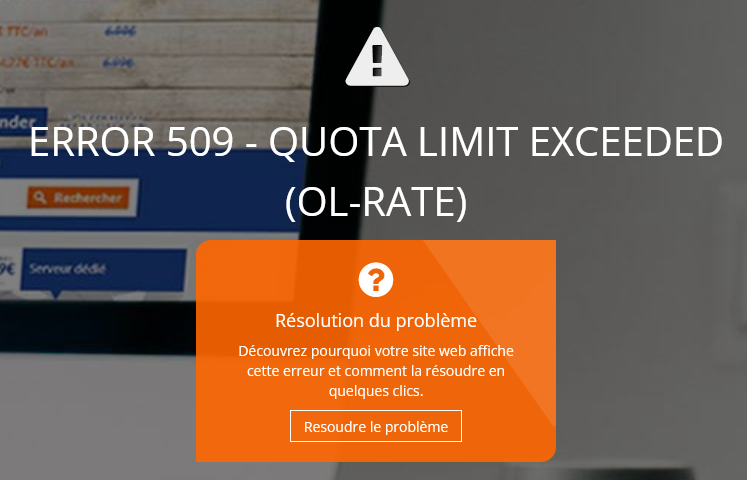
I've encountered this message when trying to post a reply:
Re: Forum has moved to a new host
Posted: Thu Nov 20, 2025 9:58 pm
by Gambit37
Yes I'm seeing that frequently too, although it only appears briefly and then a refresh loads the forum again.
Re: Forum has moved to a new host
Posted: Thu Nov 20, 2025 11:18 pm
by ChristopheF
I saw this error 509 too. And the http 512 again.
I think I need to move back to a dedicated VPS hosting plan, similar to what we had before. I can get a refund for the next 20 days or so.
I'll look into it.
Re: Forum has moved to a new host
Posted: Sun Nov 23, 2025 11:28 pm
by ChristopheF
After some downtime again tonight, the site is back in a dedicated VPS (Virtual Private Server) instead of a shared hosting plan.
Hopefully the various errors we have seen in the past days are gone.
I have added the pycode theme (dark) and the darkmode extension.
You may select your preferred theme (prosilver or pycode) from the
User Control Panel
You may select Light mode / Dark mode in the top right (this simply inverts all colors in the current selected theme).
Depending on your feedback we'll keep one or the other, or both, or even select another theme.
@Gambit37, the site logo looks bad in dark themes. Could you work some magick tricks to make a nicer logo? The image must be a gif of 149x52 pixels with transparency.
Re: Forum has moved to a new host
Posted: Mon Nov 24, 2025 1:26 am
by Gambit37
Awesome, thank you Christophe.
I'm not seeing a theme selector in the ucp? I've been through every tab/option.
Happy to make a new logo. We could put an SVG in there which will look much better. I'll investigate.
Re: Forum has moved to a new host
Posted: Mon Nov 24, 2025 1:55 am
by ChristopheF
oops I forgot to enable the theme again after restoring the last database. This is fixed and should work now from the
User Control Panel
SVG would be even better for the logo, thanks.
Re: Forum has moved to a new host
Posted: Mon Nov 24, 2025 2:36 pm
by Ameena
Trying out the new theme - the dark grey is reminiscent of the old skin we used to have (with the DM artwork at the top), so I'll keep it for now
.
Re: Forum has moved to a new host
Posted: Sat Nov 29, 2025 12:21 pm
by Ameena
I hav noticed one thing about the new dark theme - it doesn't seem to know how to mark that there are new posts in a sub-forum. I saw there was a marker for new posts in "Custom Dungeons", for example, which has a line of links directly to each of its sections, but none of them were in a different colour or anything (as they are on the default colour scheme), so it would require clicking through each one or clicking into Custom Dungeons to see them as a "proper" list to see which one had new posts (it was the RTC section).
I dunno if this is something that can be changed/fixed...?
Re: Forum has moved to a new host
Posted: Sat Nov 29, 2025 1:27 pm
by ChristopheF
You may contact the theme developer to notify them about this issue:
https://www.phpbb.com/customise/db/style/pycode/
To find new posts, I always use this page:
search.php?search_id=newposts
(available in Quick Links menu at the top-left of pages)

